
With hundreds or thousands of competitors in your market, buyers are bombarded with similar-sounding solutions — making it extremely difficult for small firms to differentiate themselves. Today’s tech-savvy population has high expectations for digital engagement, making an effective online presence crucial – Your prospective clients demand a high credibility standard — and your website is often the first trust signal.
Budget Constraints vs. High Expectations
Small companies are expected to generate qualified leads with a fraction of the budget larger firms have, pushing toward high-impact, low-cost strategies like email marketing, SEO, social media and direct outreach.
You’ve got to spread your limited Marketing budget across channels in order to effectively reach your target audience. Business is all about people and your most valuable marketing activities are in-person, online live events or one-on-one video meetings. You can’t afford to spend your entire annual marketing budget on an agency developing your website.
Publish a Competitive Professional Services Website for $60
If you are comfortable with the WordPress block editor and have a DYI mindset this is a possible solution. You can stand up your site quickly and easily train your staff or hire creators to add content for review and publication. I have created the WordPress UpsideNowBasic Theme to help professional services business owners quickly create a high-performance website.
DISCLAIMER: This article deals with the tech involved in setting up the framework for your site and enabling content. The content creation part itself is where you will spend time and resources creating your messaging. Content creation is beyond the scope here. In my example, I have created my initial content ahead of time.
Why Choose This Approach
One of the most unfortunate scenarios I have encountered is where a business owner hires an expensive agency to build its website. After completion, the owner decides not to renew the agency contract. Two years later, the owner and the staff wish to update the look-and-feel of their site. They are unable to do so because the agency left an overly-complex software framework in place. The staff cannot even change the ‘skins’ (i.e. page images) without re-hiring the agency or doing a complete overhaul.
Using the UpsideNowBasic Block Theme
I might mention that I am a software engineer by trade. Over my 25+ year Fortune 500 career, I have worked on and managed many large-scale software products and services. I have witnessed the difference between clean, well-managed software projects vs. pure chaos.
I created the UpsideNowBasic theme to enable a first-rate professional website as quickly and easily as possible. I also wanted to avoid plugins or over-complicated designs. I wanted to create sites that are easy to train staff and content providers to use, maintain and refresh. And I wanted to leave the design possibilities infinite. Read more about block themes Block Themes vs. Classic Themes: Which Should You Choose for WordPress?
UpsideNowBasic fully leverages the WordPress block theme tools and methodology. WordPress block themes offer enhanced customization through Full Site Editing, allowing users to design every part of their site visually without coding. They also provide a more flexible and user-friendly experience compared to classic themes, making it easier to create and manage layouts.
NOTE: For you developers out there, like me, the theme files can be managed and edited directly using Visual Studio Code and command line tools. With the block theme most of the coding is in .json and .html with reduced reliance on lesser-known .php used in classic themes.
The UpsideNowBasic theme is designed for small business owners to quickly and economically create, publish, and maintain a clean, professional, high-performance website. It includes a curated collection of popular color schemes, pre-installed fonts and formatted templates to jump-start your development process. In addition to being simple to use, it offers infinite flexible design options so your website can live and grow along with your business.
1.UpsideNowBasic Theme:
- Quick – Build Your Website Framework in Less than an Hour
- Keep it Simple – Easy to Expand and Manage
- High-Performance – Maintain Google SEO Performance Metrics
- Doesn’t Lock You In to an Over-Engineered Complex Software Stack
- Easy to Maintain, Completely Portable
Five Step Instructions
1.Procure WordPress Subscription & Domain Name
WordPress offers five different subscription levels. This technique will work on all of them but for purposes of this money-saving demo, I’m using the Personal Subscription model which is the least expensive, yet has everything you need for this project. At the time of this writing, it cost $48 for the first year including hosted site and domain name registration. You can then register your DNS domain name.
2.Step Two – Setup a Blank Site & Install UpsideNowBasic
Download the UpsideNowBasic Theme .zip file and accompanying content.xml file from the WordPress Market or directly from GitHub.
Once you have your domain, you can go ahead and use WordPress to create a blank site. Once the site is up, click on the Appearance – Themes tab and click on ‘Install new theme’. Upload the upsidenowbasic.zip file and click ‘Install Now’. After installation is completed, go to the Appearance – Themes tab and activate UpsideNowBasic.
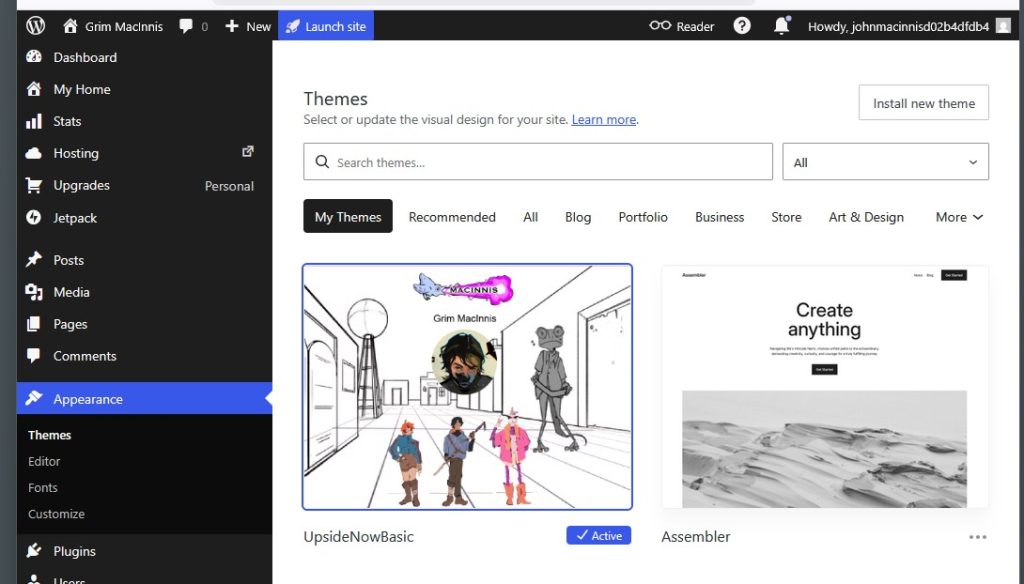
Next go to the Tools – Import tab and install the WordPress Importer. Click on ‘Run Importer’ and browse to the content.xml file. Then click ‘Upload file and import’. You now have an internet ready theme and 4-page website layout and are ready for customization and adding your content.
3.Step Three – Customize Theme for Your Brand
Click on the Appearance – Editor – Styles tab and browse through the customization features. UpsideNowBasic has pre-installed a set of popular Google fonts and includes a curated collection of color palettes. Not to worry if you change your mind later, I’m certain you will. You can swap out design elements at a click, which propagates across your site. (NOTE: It’s always best to make customizations at the highest level possible and avoid too many page-level .html customizations in terms of colors and fonts or other elements you want to be consistent across your site.)
4.Step Four – Add Content & Publish
Use the block editor tools, add your content and publish your site.
5.Step Five (optional) – Google SEO Performance Metrics & Security Check
There are various tools available to analyze your SEO, site performance and security.